¶ 1、背景
为便于各种三方接入31会议系统的用户登录于参会人系统,特此将31OpenAPI 、31SSO、参会人接入等常见接入解决方案整合为一篇文档。
目前常用的三方联合登录的访问逻辑如下图所示。
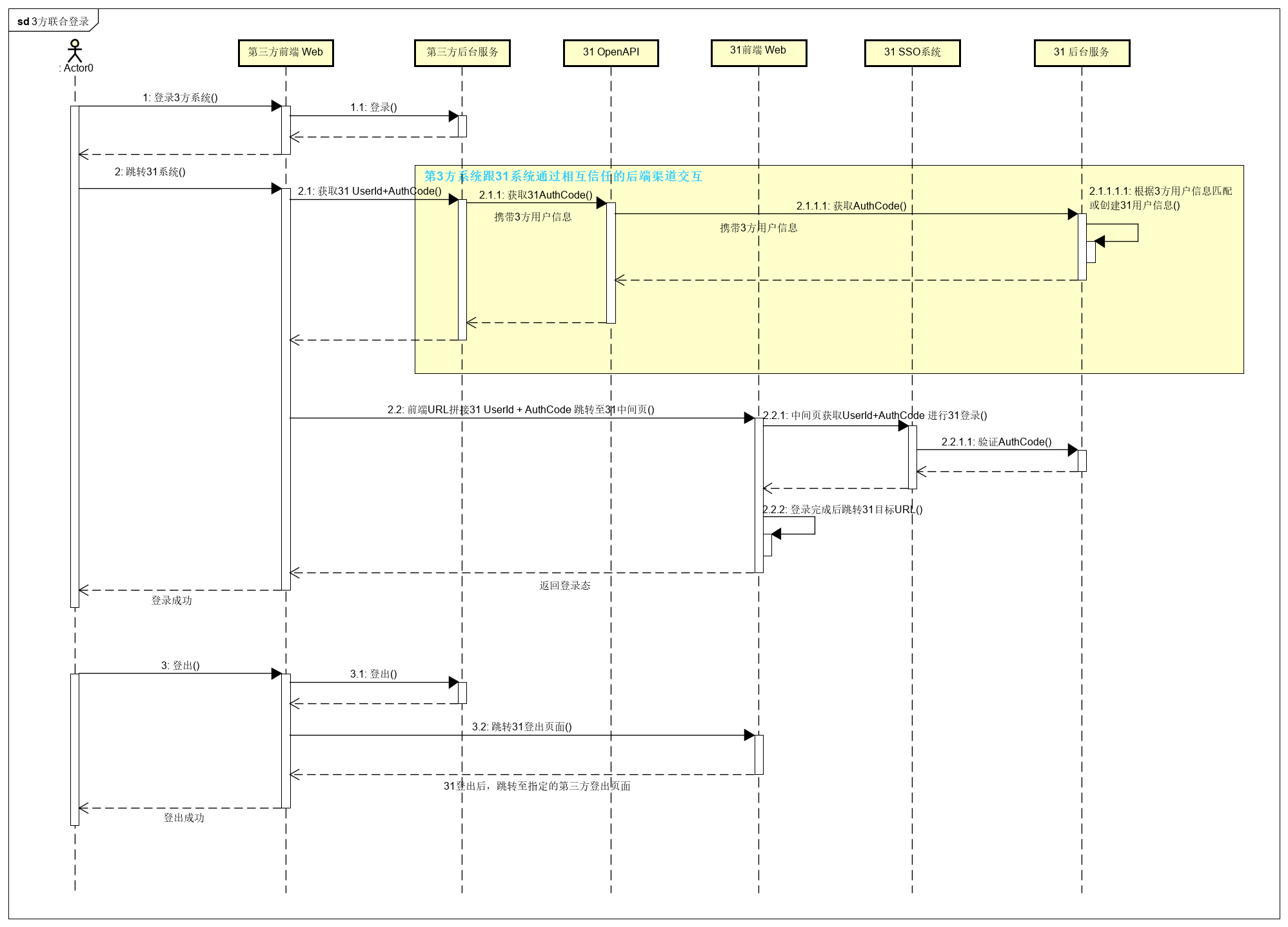
通过流程图可以知道,总共需要的步骤有
- 准备工作:获取OpenApi的访问授权客户ID以及密钥;
- 访问31SSO获取OpenApi的访问token
- 使用此token传入用户信息,获取或创建账户
- 获取账户的authcode
- 使用中间页跳转到目标页面,并带入账户token
- 登录完成。
¶ 2、具体步骤
¶ 2.1 OpenAPI接入
这一部分内容请参考 API中心介绍
¶ 2.2 注册或获取用户身份
调用这个接口,当用户存在则会返回AccountId,当用户不存在则会创建用户并返回AccountId,用户的AccountId是后续一系列操作的凭据之一。
作为用户的登录凭据,这个接口的acocountName、email、mobile,三者至少需要写入一种,三者不能重复。acocountName必须以字母开头。
¶ C侧创建账号
¶ 基本信息
Path: {$OpenAPIHost}/op/userresource/AccountUser/v1/createForClient
Method: POST
接口描述:
¶ 请求参数
Headers
| 参数名称 | 参数值 | 是否必须 | 示例 | 备注 |
|---|---|---|---|---|
| Content-Type | application/json | 是 | ||
| Authorization | Bearer ${access_token} | 是 |
Body
| 名称 | 类型 | 是否必须 | 默认值 | 备注 | 其他信息 |
|---|---|---|---|---|---|
| accountName | string | 非必须 | |||
| string | 非必须 | ||||
| mobile | string | 非必须 | |||
| fullName | string | 非必须 | |||
| firstName | string | 非必须 | |||
| middleName | string | 非必须 | |||
| lastName | string | 非必须 | |||
| nickname | string | 非必须 | |||
| jobNumber | string | 非必须 | |||
| password | string | 非必须 | |||
| source | integer | 非必须 |
EnumAccountSourceType: 0-Unknow; 1-UserRegister_Bvent; 2-UserRegister_LiteBvent; 3-UserRegister_Expo; 4-Planner_Add; 5-Exhibitor_Add; 6-Purchaser_Add; 7-OM_Add; 8-LiteRegistOrg; 9-OpenApiRegistOrg |
format: int32 枚举: 0,1,2,3,4,5,6,7,8,9 |
|
| gender | integer | 非必须 |
EnumGenderType: 0-Unknow; 1-Male; 2-Female |
format: int32 枚举: 0,1,2 |
|
| idImage | string | 非必须 | |||
| language | string | 非必须 | |||
| department | string | 非必须 | |||
| birthday | string | 非必须 | format: date-time | ||
| prefix | string | 非必须 | |||
| profileImage | string | 非必须 | |||
| company | string | 非必须 | |||
| country | string | 非必须 | |||
| englishName | string | 非必须 | |||
| position | string | 非必须 | |||
| idType | integer | 非必须 | 证件类型 |
format: int32 枚举: 0,1,2,4,8,16,32,64,128,256,512,1024,2048,4096,8192,16384 |
|
| idNumber | string | 非必须 | 证件号码 | ||
| isMobileActivated | boolean | 非必须 | |||
| isEmailActivated | boolean | 非必须 |
¶ 返回数据
| 名称 | 类型 | 是否必须 | 默认值 | 备注 | 其他信息 |
|---|---|---|---|---|---|
| sysMessage | string | 非必须 | |||
| sysCode | integer | 非必须 |
EnumSystemCode: 1000-成功; 1001-内部错误; 1002-程序出错; 1003-服务器通信错误; 1004-服务器通信超时 |
format: int32 枚举: 1000,1001,1002,1003,1004 |
|
| isSuccess | boolean | 非必须 | |||
| businessMessage | string | 非必须 | |||
| businessCode | integer | 非必须 | format: int32 | ||
| returnObj | object | 非必须 | |||
| ├─ accountId | string | 非必须 | |||
| ├─ mobile | string | 非必须 | |||
| string | 非必须 | ||||
| ├─ accountName | string | 非必须 | |||
| ├─ isNewCreated | boolean | 非必须 | |||
| ├─ createStatus | integer | 非必须 | CreateAccountStatus: 0-Success;-1-Error |
format: int32 枚举: 0,-1 |
|
| ├─ errorMessage | string | 非必须 | |||
| pager | object | 非必须 | |||
| ├─ pageIndex | integer | 非必须 | format: int64 | ||
| ├─ pageSize | integer | 非必须 | format: int64 | ||
| ├─ skip | integer | 非必须 | format: int64 | ||
| ├─ totalCount | integer | 非必须 | format: int64 | ||
| ├─ totalPage | integer | 非必须 | format: int64 |
¶ 2.3 用户登录
获取用户的AccountId之后,可以用AccountId来换取用户的登录认证code。loginUserId传入刚才获取的AccountId,返回的Data就是登录认证code
¶ 获取usercode
¶ 基本信息
Path: {$OpenAPIHost}/op/security/usercode
Method: GET
接口描述:
¶ 请求参数
Query
| 参数名称 | 是否必须 | 示例 | 备注 |
|---|---|---|---|
| loginUserId | 是 | 用户id | |
¶ 返回数据
| 名称 | 类型 | 是否必须 | 默认值 | 备注 | 其他信息 |
|---|---|---|---|---|---|
| businessMessage | string | 非必须 | |||
| businessCode | number | 非必须 | 业务代码(默认0代表成功) | ||
| data | string | 非必须 |
¶ 2.4 前端中间页登录
前端登录的中间页的地址是
{$ConfHost}/home/autoLogin.html?uid=code=returl=
| 参数名称 | 是否必传 | 参数说明 |
| uid | 是 | 用户id,即AccountId,见步骤2.2 |
| code | 是 | 根据用户id获取的登录code,见步骤2.3 |
| returl | 是 | 登录成功以后访问的目标地址 |
如果之前得到的AccountId,UserCode都是正确的,那进入这个页面后会自动跳转到returl,并且带上用户的访问token。
如果是浏览器访问,前端站点会用定时器自动管理token的刷新。
¶ 2.5 创建参会人
经过以上2.2的C端账号创建接口,就已经添加了用户和账户信息了。
如果需要将账户添加为参会人关联到一场具体的会议中(使用参会人相关的功能),则需要使用以下的参会人相关接口。
这一部分内容请参考 参会人注册
3、注意事项
¶ 3.1 环境说明:
| Host | 说明 | 测试环境Host | 生产环境Host |
| Oauth | SSO认证与Token颁发 | https://test2-oauth.31huiyi.com | https://oauth.31huiyi.com/ |
| OpenAPI | 31OpenAPI | https://test2-31api.31huiyi.com | https://31api.31huiyi.com |
| Conf | 前端登录 | https://test2-conf.31huiyi.com | https://conf.31huiyi.com |
¶ 4、附件
¶ 4.1 postman配置文件
/openapi.postman_collection.json